
Tap heatmaps
See where fans actually tap on your page, how far down they get, and which taps land on nothing.
What it shows#
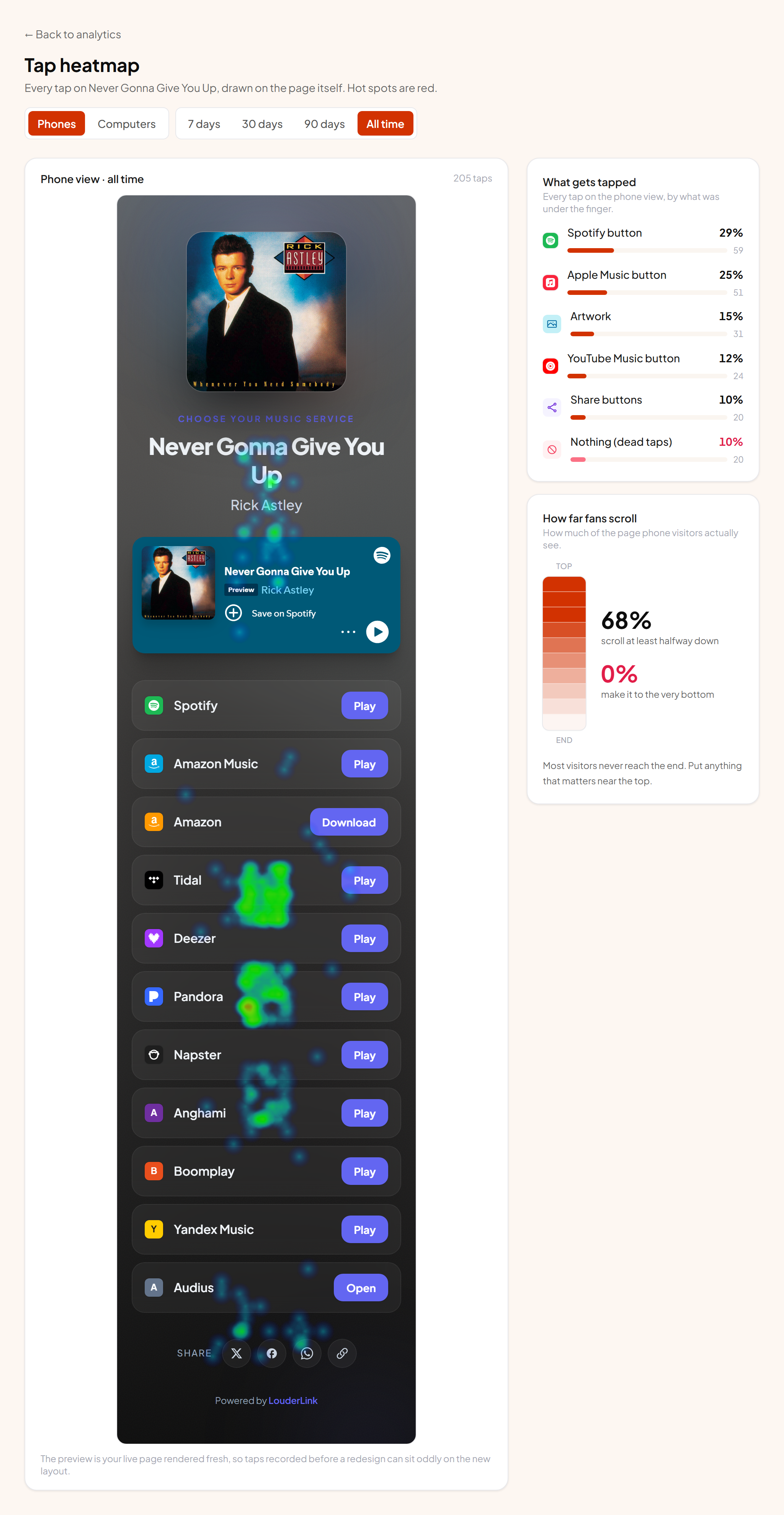
The heatmap draws every tap fans have made straight onto your own page. Busy spots are red, quiet ones blue. Open it from the Heatmap button at the top of a link's stats page, or from a bio page's stats.
Phones and computers are separate#
The layout differs between a phone and a desktop browser, so mixing them would put taps in meaningless places. The two tabs keep them apart, and the panels on the right follow whichever tab you're on. The page opens on whichever one has more taps recorded.
What gets tapped#
Every tap is grouped by what was underneath it: a specific service button, the artwork, the email form, the share buttons. The bar shows each one's share of all taps and the raw count.
The row worth watching is Nothing (dead taps). Those are taps that landed on something that isn't interactive. A few are normal. Above 15% we flag it, because it usually means something looks like a button and isn't. Artwork is the usual culprit: fans try to tap the cover expecting it to play.
★ What to do about dead taps
How far fans scroll#
The vertical bar beside it is your page from top to bottom, shaded by how many visits reached each part. Solid means nearly everyone saw it, faint means almost nobody did. The two numbers are the share who got at least halfway, and the share who reached the very bottom.
If the bottom figure is low, anything sitting down there is effectively invisible. Move the things that matter, usually the email form or your main button, above the fold.
What we record#
Taps are stored as a position on the page and what was under them. There is no visitor id attached, no recording of the session, and no way to replay an individual person's visit. It is a count of taps and nothing more, and it only runs for visitors who accepted analytics.
Two things to keep in mind#
- 1 Old taps sit on the current design The preview is your page as it looks right now. If you redesigned it last week, taps recorded before that will land in odd places.
- 2 Studying your own heatmap doesn't pollute it The preview we render for you records nothing: no view, no taps, no pixels. You can open it as often as you like.